
Group trip planner with voting
Group Trip Planner: Compare Options, Vote and Share an Itinerary.
Put your trip options in one place, hear from your group, and turn the chosen plan into an organized trip.
How it works, in five steps
From “where should we go?” to a trip everyone can see, with one link for the group. Start with a travel list, or go straight to planning.
-
Collect ideas with friends (optional)
In Travel ideas, make a travel list, like “Lisbon someday”. Add places, links and notes in one box; TripOrganize works out where each idea is and groups them by place. Invite friends with one link to like, love and comment.
When you’re ready, tap Plan a trip with this travel list and your ideas become the starting point for the plans below. No list? Just describe the trip instead.
Who: anyone with the invite link can like, love and comment, without an account; signing in lets them add ideas too. Lists don’t give anyone access to your trips.
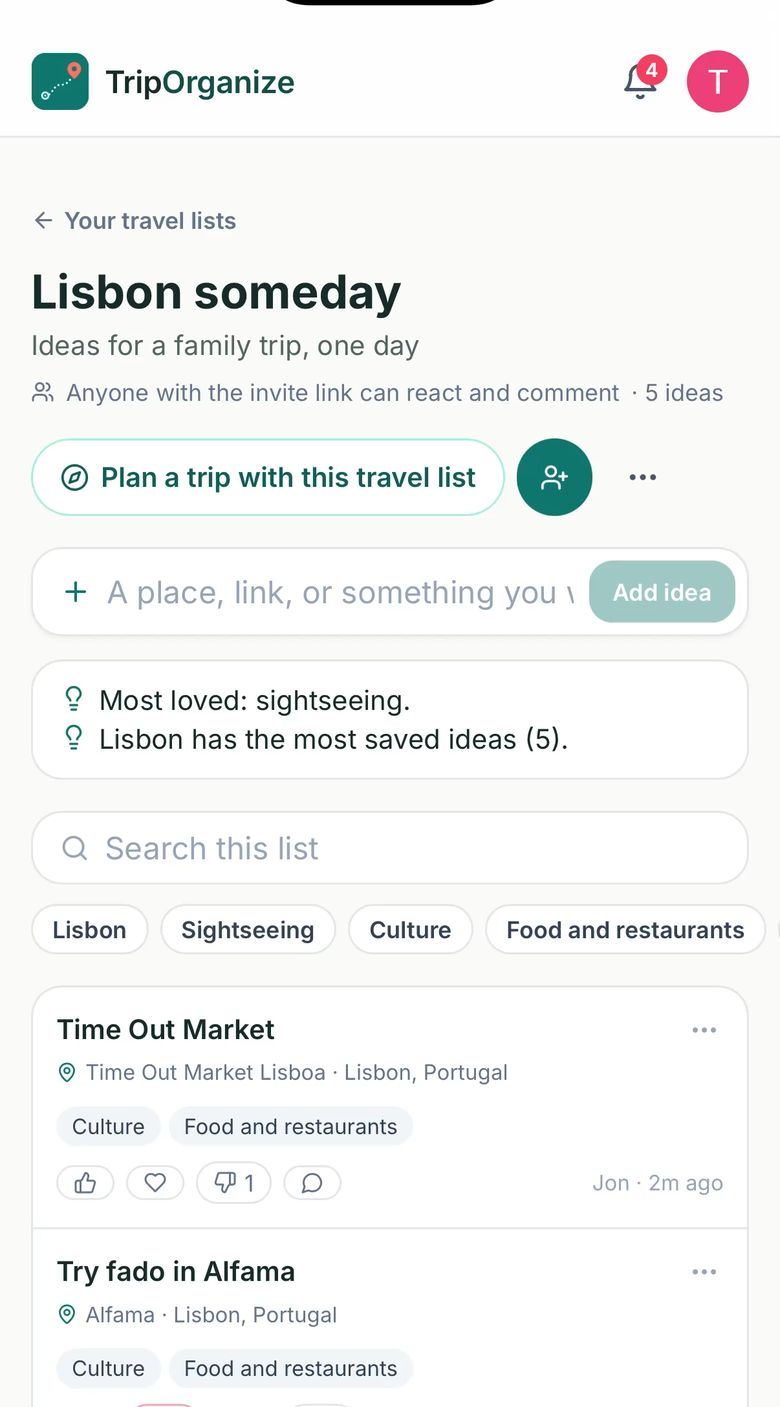
A travel list your friends react to, ready to turn into a trip. -
Compare options
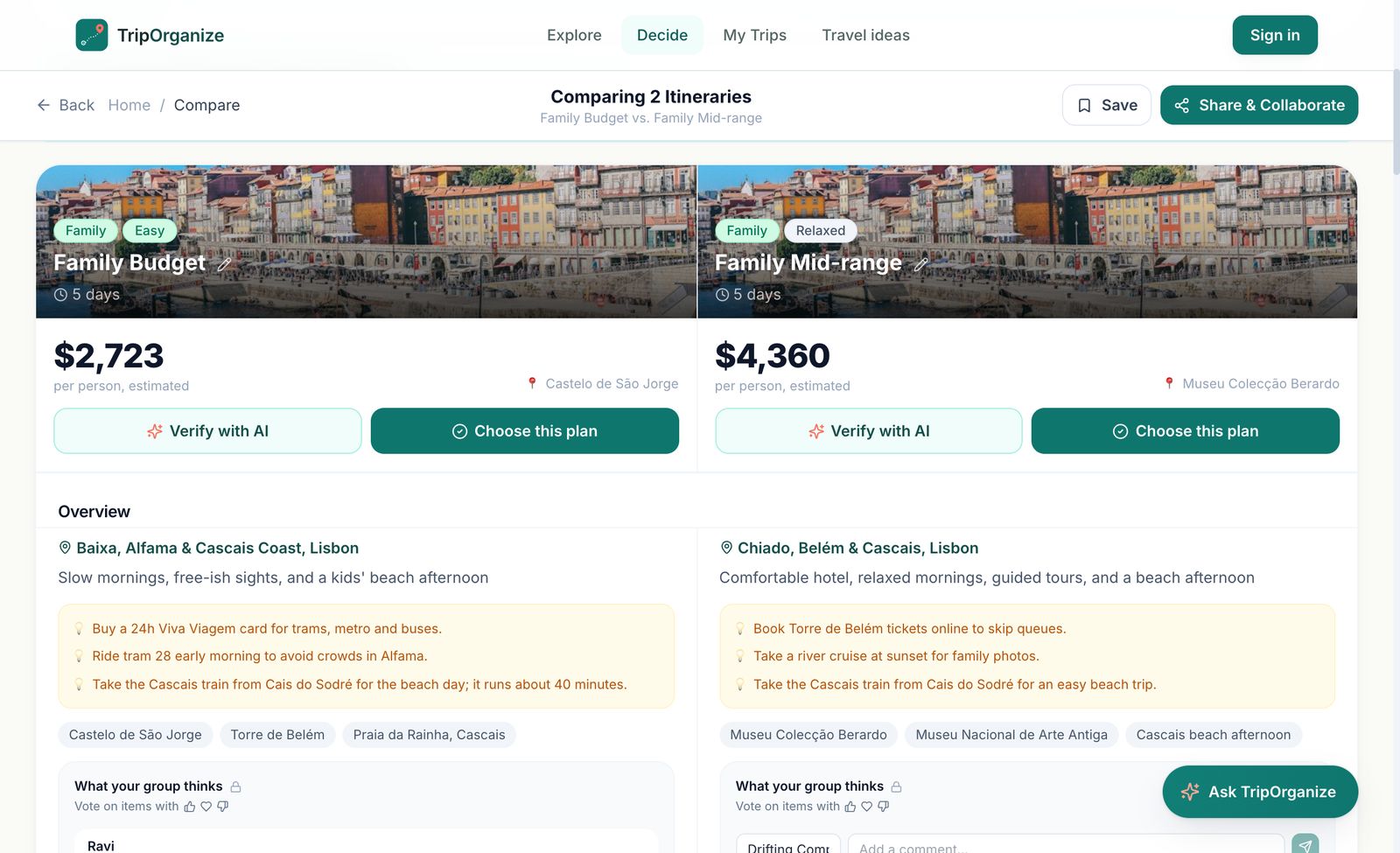
In Explore, describe the trip: who’s going, when, and what you like. TripOrganize builds three priced plans. Pick two or three and tap Compare to see flights, hotels, estimated costs, the day-by-day plan and a map side by side (shown above).
Something off? Ask the companion at the top of Compare, “make it more kid-friendly”, and the options update.
Who: anyone. Planning and comparing work without an account; sign in to save a comparison to My Trips.
-
Vote and comment
Tap Share & Collaborate and send the link to your group. On every stop, people react with 👍 want it, ❤️ love it or 👎 not for me, and leave comments under each option in What your group thinks. There’s a group chat too; tag @TripOrganize to ask a question.
You see where the group agrees, and what to drop, before anyone books.
Who: the organizer signs in to share. Everyone with the link can vote and comment without an account.
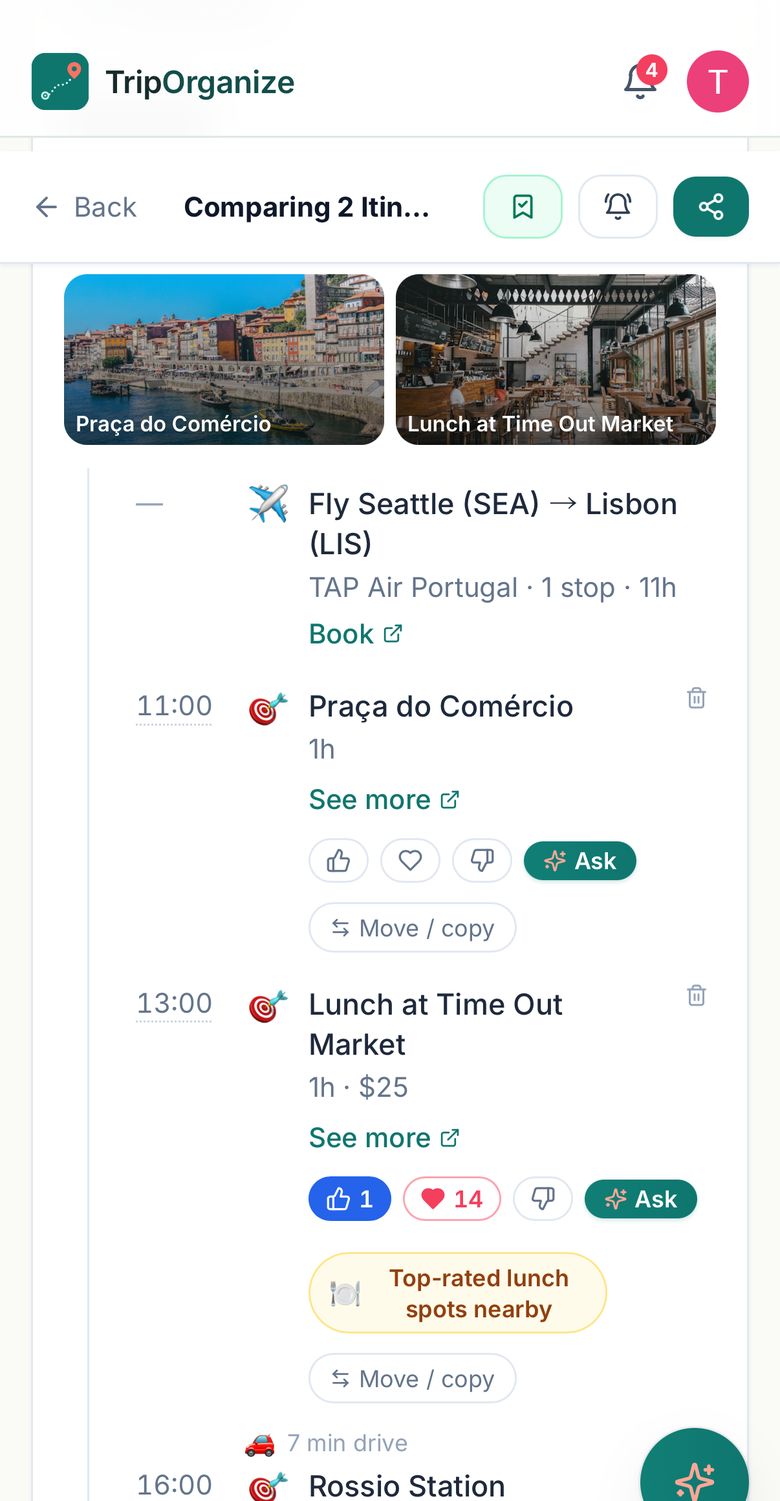
Votes on each stop, from the group’s own phones. -
Choose a plan
When the group has weighed in, tap Choose this plan on the winner. It’s saved to My Trips as your trip, and the shared planning link closes so everyone moves to the plan you picked.
Choosing isn’t booking. Nothing is reserved or paid for, and comparison prices are estimates.
Who: the organizer, signed in.
-
Organize the trip
Book flights, hotels and activities wherever you like. Then forward each confirmation email to your TripOrganize address and it lands in the trip, marked Booked. Ideas you haven’t booked yet stay marked Suggested.
Use Add people to put everyone on one trip page, with the itinerary, packing list, checklist and files.
Who: the organizer adds bookings and invites people; people sign in to join the trip page.
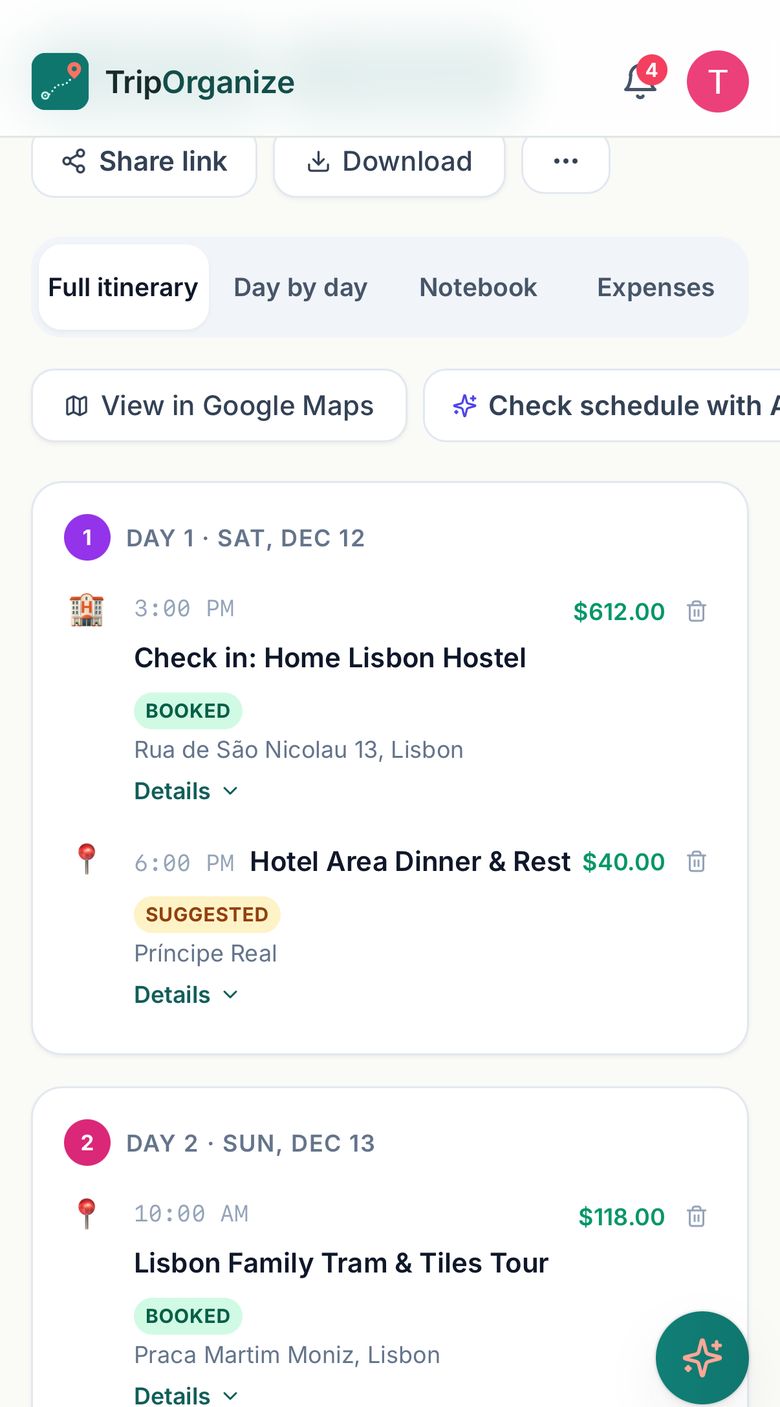
The chosen plan with real bookings added: Booked and Suggested, at a glance.
From booking email to organized trip
Forward the confirmation you already have. TripOrganize reads it and adds the booking to the matching trip.
Booking email
From: reservations@casa-alecrim.example · Subject: Your booking is confirmed
Casa Alecrim Lisbon
Rua do Exemplo 12, Lisbon
Check-in: Sat, Dec 12, 2026 from 3:00 PM
Check-out: Wed, Dec 16, 2026 by 11:00 AM
Confirmation number: CA-58213
Room (4 nights): $560.00 · Taxes: $52.00
Total: $612.00
In your trip
- Day 1 · Sat, Dec 12 · 3:00 PM
- Rua do Exemplo 12, Lisbon
- Confirmation CA-58213
- Charges: Room $560.00 · Taxes $52.00
Illustrative example using fictional booking details.
- In My Trips, open Import a trip from email. The Forward tab shows your own TripOrganize address.
- Forward the confirmation from your inbox to that address, or use the Paste tab to paste the email’s text.
- TripOrganize adds it to the trip with the matching place and dates, or starts a new trip. Cancellation emails update the trip too.
Works for flights, hotels, car rentals, trains, cruises, restaurants, parking and activities. Forwarding is free on every plan; Pro also keeps each booking email on the trip as a PDF. On a shared trip, your confirmation numbers stay visible only to you.
What’s included?
Planning and comparing are free. Pro is for organizers who share and collaborate on more than one trip a year.
| For this workflow | Free | Pro |
|---|---|---|
| Travel lists you can share with friends | 5 lists | Unlimited |
| Plan trips with AI and compare options | ✓ | ✓ |
| Share & collaborate (votes, comments, group AI chat) | 1 trip a year | Unlimited |
| Shared comparison links | Expire after 90 days | Never expire |
| Forward booking emails to add them to a trip | ✓ | ✓ |
| Trips on My Trips | 4 most recent | Unlimited |
| Photo scans of receipts & confirmations | 1 per trip | 30 per trip |
| Booking emails saved on the trip as PDFs | — | ✓ |
Pro is $2.99/month or $17.99/year, with a 14-day free trial and no card needed. A Trip Pass ($0.99, one time) unlocks Pro features for a single trip. Group members don’t need a plan, or an account, to vote and comment. See full pricing.
Questions
Can we collect ideas before we plan a trip?
Yes. Make a travel list in Travel ideas and invite friends with its link: everyone can like, love and comment, and people who sign in can add ideas. A list doesn’t need dates or a trip. When you’re ready, Plan a trip with this travel list starts the planning from your ideas.
How does group trip voting work?
Share your comparison with one link. Everyone who opens it can react to each stop with 👍 (want it), ❤️ (love it) or 👎 (not for me), and leave comments on each option. The votes and comments show for the whole group as they come in.
Do people joining my trip need an account?
Not to vote or comment: anyone with the comparison link can do both. The organizer signs in to share the comparison and to choose a plan. To join the trip page after a plan is chosen, people sign in.
Does choosing an itinerary book the trip?
No. “Choose this plan” saves the itinerary to My Trips as your plan. Prices on a comparison are estimates. You book flights, hotels and activities yourself, on the sites you prefer, then add the confirmations to the trip.
Can I organize booking confirmation emails?
Yes. Forward a confirmation to your personal TripOrganize address (shown in My Trips under Import a trip from email), or paste the email’s text there. TripOrganize adds the booking to the matching trip, or starts a new one. Forwarding works on every plan.
What is included for free, and what requires a paid plan?
Planning, comparing and forwarding booking emails are free. On Free, the organizer can share 1 trip a year for votes, comments and group chat, and shared comparison links expire after 90 days. Pro ($2.99/month or $17.99/year) makes sharing unlimited; a Trip Pass ($0.99) unlocks Pro features for one trip.
Help your group choose a plan—and keep the trip organized.
More reading: planning a group trip and splitting costs · watch the full demo